![[PHP] 파일 업로드 (디렉토리, 파일명 변경), 다운로드](https://img1.daumcdn.net/thumb/R750x0/?scode=mtistory2&fname=https%3A%2F%2Fblog.kakaocdn.net%2Fdna%2Fc0HSUS%2FbtsymOSybcW%2FAAAAAAAAAAAAAAAAAAAAALgEEZin_e1dFERGxeVgdTUBr7W7EBCHBZGgbyLgg38f%2Fimg.png%3Fcredential%3DyqXZFxpELC7KVnFOS48ylbz2pIh7yKj8%26expires%3D1777561199%26allow_ip%3D%26allow_referer%3D%26signature%3DVqztpDfNL7tmG%252BBUZ2CDplOBPY8%253D)
PHP를 이용한 파일 업로드 기능 구현!
화면
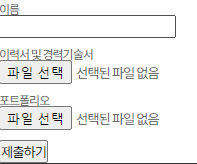
<form name="apply" id="apply" method="post" action="/recruit/apply.exe.php" enctype="multipart/form-data">
    <div class="form-group">
        <label for="name">이름</label>
        <input type="text" id="name" name="name">
    </div>

    <div class="form-group">
        <label for="resume">이력서 및 경력기술서</label>
        <input type="file" id="resume" name="upfile1">
    </div>
    <div class="form-group">
        <label for="cover_letter">포트폴리오</label>
        <input type="file" id="cover_letter" name="upfile2">
    </div>

    <button type="submit">제출하기</button>
</form>
<form>의 method는 post , enctype="multipart/form-data" 을 추가해준다
<input type ="file"> 로 버튼 클릭시 form 내용을 가지고 action 주소로 이동한다
함수호출
// 첫 번째 파일 업로드(필수)
$file1 = $_FILES['upfile1'];
if ($file1['error'] === UPLOAD_ERR_NO_FILE) {
    echo "파일을 선택해주세요.";
} else {
    $idata['upfile1'] = uploadFile($file1,$destination, $idata, '이력서');
}

// 두 번째 파일 업로드
$file2 = $_FILES['upfile2'];
if ($file2['error'] !== UPLOAD_ERR_NO_FILE) {
    $idata['upfile2'] = uploadFile($file2,$destination, $idata, '포트폴리오');
}
$_FILES 변수를 통해 배열로 기본 정보( name, type, size, tmp_name, error)가 전달되기때문에
파일 첨부 유무는 $_FILES['error']를 통해 확인한다
file1,과 file2의 필수 유무에 따라 $file1['error'] === UPLOAD_ERR_NO_FILE 로 구분하여 uploadFile 함수를 실행시켜준다
실행결과는 파일 이름이 리턴되고 각 함수에 파일이름을 저장해준다
파일 업로드
function uploadFile($file,$destination, $idata, $file_type) {
    // 파일 속성
    $file_name = $file['name'];
    $file_tmp = $file['tmp_name'];
    $file_size = $file['size'];
    $file_error = $file['error'];

    // 허용확장자 지정
    $allowFile = array("jpg", "jpeg", "png", "pdf", "doc", "docx", "txt", "rtf");
    // 파일저장위치
	$destination = "/home/website/planb/engine/";
    // 파일 확장자 추출
    $file_ext = explode('.', $file_name);
    $file_ext = strtolower(end($file_ext));

    // error 체크
    if ($file_error === 0) {
        // 허용 확장자 체크
        if (in_array($file_ext, $allowFile)) {
            // 파일 사이즈 체크
            if ($file_size <= 52428800) { // 50MB 이내
                // 새 파일 이름 생성 (날짜_이름_파일타입.확장자)
                $file_name_new = time() . '_' .$idata['name'] .'_' .$file_type .  '.' . $file_ext;
                // 저장위치+새 파일이름
                $file_destination = $destination . $file_name_new;

                // 파일을 업로드 폴더로 이동
                if (move_uploaded_file($file_tmp, $file_destination)) {
                    return $file_name_new;
                    echo "업로드 완료.";
                }
            } else {
                echo "파일 크기가 너무 큽니다.";
            }
        } else {
            echo "파일 확장자가 잘못되었습니다.";
        }
    } else {
        echo "파일 업로드 중 오류가 발생했습니다.";
    }
}
파일 업로드시 임시로 저장이 되고 파일을 이동시켜주면 삭제된다
임시 저장될때의 이름이 tmp_name
$allowFile - 업로드 가능한 확장자를 지정해주고
$file_ext -임시 저장된 name의 확장자를 저장해준다
in_array($file_ext, $allowFile) 업로드한 파일 이름(확장자)에 $ allowFile가 있는지 확장자 체크
$file_name_new : 수정하고싶은 파일 이름 저장, 마지막에 확장자( $file_ext) 꼭 넣어주기
$file_destination : 이동경로 + 새이름
move_uploaded_file($file_tmp, $file_destination)
(임시저장 파일, 이동경로+이름)
file_tmp의 이름을 가진 파일이 위에서 지정한 경로로 새이름을 가지고 저장된다
이동 완료시 $file_name_new 를 리턴해주고
sql문을 작성해준다
파일경로/ 파일이름 컬럼에 insert!
디렉토리 생성
if(!is_dir($경로)){
    mkdir($경로,0777,true);
}
로컬이 아닐때 서버에 일일이 디렉토리를 만들기 번거로우니
디렉토리가 없으면 생성해주는 코드 추가
다운로드
<a href="../download.php?path=파일경로&filename=파일이름"></a>
get 형식으로 파일경로와 파일이름을 담아서 download.php 파일로 넘겨준다
<?php

$path = $_GET['path'];
$filename = $_GET['filename'];

  $down = $path.$filename;
  $filesize = filesize($down);

  if(file_exists($down)){
      header("Content-Type:application/octet-stream");
      header("Content-Disposition:attachment;filename=$filename");
      header("Content-Transfer-Encoding:binary");
      header("Content-Length:".filesize($path.$filename));
      header("Cache-Control:cache,must-revalidate");
      header("Pragma:no-cache");
      header("Expires:0");
      if(is_file($down)){
          $fp = fopen($down,"r");
          while(!feof($fp)){
              $buf = fread($fp,8096);
              $read = strlen($buf);
              print($buf);
              flush();
          }
          fclose($fp);
      }
  } else{
    msg("존재하지 않는 파일입니다.", "back");
  }
?>
정상적으로 했는데도 업로드가 안되는 경우는
디렉토리 권한 문제일 수 있으니 확인해보기 !!!!