![[PHP] 로그인, 로그아웃](https://img1.daumcdn.net/thumb/R750x0/?scode=mtistory2&fname=https%3A%2F%2Fblog.kakaocdn.net%2Fdna%2FM08GQ%2FbtrTKsaUIzs%2FAAAAAAAAAAAAAAAAAAAAAHkovXqyb9TR1SUdeTXUy0EyOySmOmTLIQWFaEeynspi%2Fimg.png%3Fcredential%3DyqXZFxpELC7KVnFOS48ylbz2pIh7yKj8%26expires%3D1777561199%26allow_ip%3D%26allow_referer%3D%26signature%3D1m5DXNLXuI94%252Bbg0ZPhap5VcpOU%253D)
회원가입 했으니 로그인과 로그아웃을 해보자
로그인
login.php
   <?php
include 'index.php';
    ?>


    <?php
     if(!isset($_SESSION['userid'])) { ?>

<div class = "main">

    <h1>Login</h1>
    <form method="post" action="/stairBoard/login_ok.php" name="loginForm">
    <div class="loginForm">
        <table class="loginTab" >
                <tr class="id">
                    <td>ID</td>
                    <td><input type="text" name=userid placeholder="아이디" required></td>
                </tr>
                <tr>
                    <td>PW</td>
                    <td><input type="password" name=userpw placeholder="비밀번호" required></td>
                </tr>
        </table>


        <div class="btnset">
                <button id="submit" type="submit" value="로그인">로그인</button>

                <button id="submit"onclick="location.href='/stairBoard/join.php'">회원가입</button>
        </div>
    </form>
     </div>

</div>

    <?php } else {
        $userid = $_SESSION['userid'];
        echo "<p>WELCOME $userid($name)"; }
        ?>

</body>
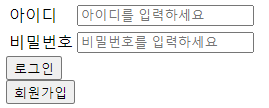
1. if문으로 세션아이디가 있는지(로그인 되어있는지) 확인
있으면 userid에 session 아이디 저장,
없으면 로그인창 출력
2. 입력후 로그인 버튼 클릭하면 form을 통해 login_ok.php로 이동
login_ok.php
<?php
include 'index.php';

session_start();

$userid = $_POST[userid];
$userpw = $_POST[userpw];

// 아이디 확인
$query = "select * from `member` WHERE userid = '$userid'";
$result = mysqli_query($connect,$query);
$row = mysqli_fetch_array($result);

$userpw_hash = $row['userpw'];

//사용자 비밀번호 입력값과 저장된 hash값 비교
if(password_verify($userpw, $userpw_hash)){

    // 세션 생성
    $_SESSION['userid'] = $row['userid'] ;

    echo "<script>alert('로그인에 성공했습니다');";
    echo "window.location.replace('list.php');</script>";
}else{
    echo "<script>alert('아이디 혹은 비밀번호가 잘못됐습니다');";
    echo "window.location.replace('login.php');</script>";
}

?>
1. form에서 POST로 넘어온 id와 pw를 변수에 저장
2. 쿼리문을 통해 db에 사용자가 입력한 id와 저장된 member의 id를 비교하여 일치하는 멤버 select
3. 그 쿼리문의 결과를 $row에 저장
4. 암호화된 비밀번호와 입력값을 비교하기 위해 password_verify 사용
5. 비교하여 일치할 경우 session에 저장
로그아웃
logout.php
<?php

session_start();

//세션 삭제
unset($_SESSION['userid']);

$URL = 'index.php';

?>

echo("<script> alert('로그아웃 되었습니다');
location.replace("<?php echo $URL?>");  </script>"
로그아웃은 간단하다
unset을 통해 session을 삭제해준다